Managing Image Galleries
This section describes how image galleries are set up and explains how to manage website images.
About Image Galleries
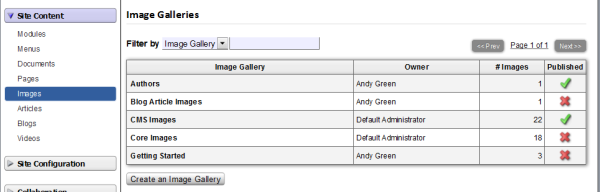
Fakoli uses image galleries to organize all images used on a site. Access to the image galleries can be controlled by user role, with different permission rules applied to different galleries, and access to entire galleries can be turned on and off.
There are two ways to view images:
- Thumbnails: view by thumbnail images
- Detailed List: view by image title, image file name, and upload date
To create and manage image galleries in the Admin section, navigate to Site Content > Images.
Creating an Image Gallery
On the Image Galleries home page, you will see a list of all your galleries or a statement that you have not created any galleries.Click the Create an Image Gallery button.
On the Definitions Tab, provide the requested information.
|
Field Name |
Use |
|
Gallery Name |
Required, provide a descriptive name to help you distinguish the gallery from others. |
|
Identifier |
Required, must be unique. Recommend using lowercase letters, no
spaces. |
|
Description |
Optional. For your internal reference/management |
|
Keywords |
Optional. |
|
Published |
Required. If un-checked, the images in this gallery may not be visible to website users. |
When you are ready, click the Add Image Gallery button.
On the Permissions Tab, you can set the access permissions to the gallery.
You can then proceed with adding images to the new image gallery, by clicking on the Images Tab. You can select the view you prefer - thumbnail or detailed list.
Adding an image
From the Image Galleries Home Page, select the image gallery for the image you want to upload.
Click the 2nd tab, titled Images.At the bottom of the screen, click the Add a new Image button.
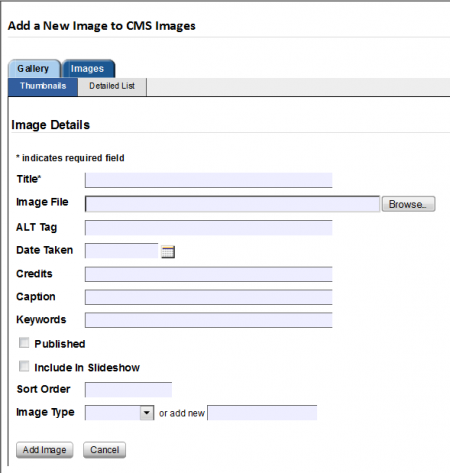
Only three fields [Title, Image File, and Published] are required. The other fields may be left blank if necessary.
|
Field Name |
Use |
|
Title |
Description of the image |
|
Image File |
The path to the image file you are planning to upload |
|
Alt Tag |
Alternative description to the image. Used for low vision screen readers |
|
Date Taken |
The date the image was created |
|
Credits |
Image credits, if applicable |
|
Caption |
An optional caption |
| Keywords | Keywords to describe the images contents |
|
Published |
Required. If un-checked, this image may not be visible to website users. |
| Include In Slideshow | Deprecated from earlier version of image gallery, please disregard. |
|
Sort Order |
Optional, used to indicate the order in which you want images to appear in a customized image gallery |
|
Image Type |
Optional |
Managing Documents » « Managing Articles